Draft · Short · 1 lineMuse match 92%
Start with the field note from March — it's where this framework first landed →
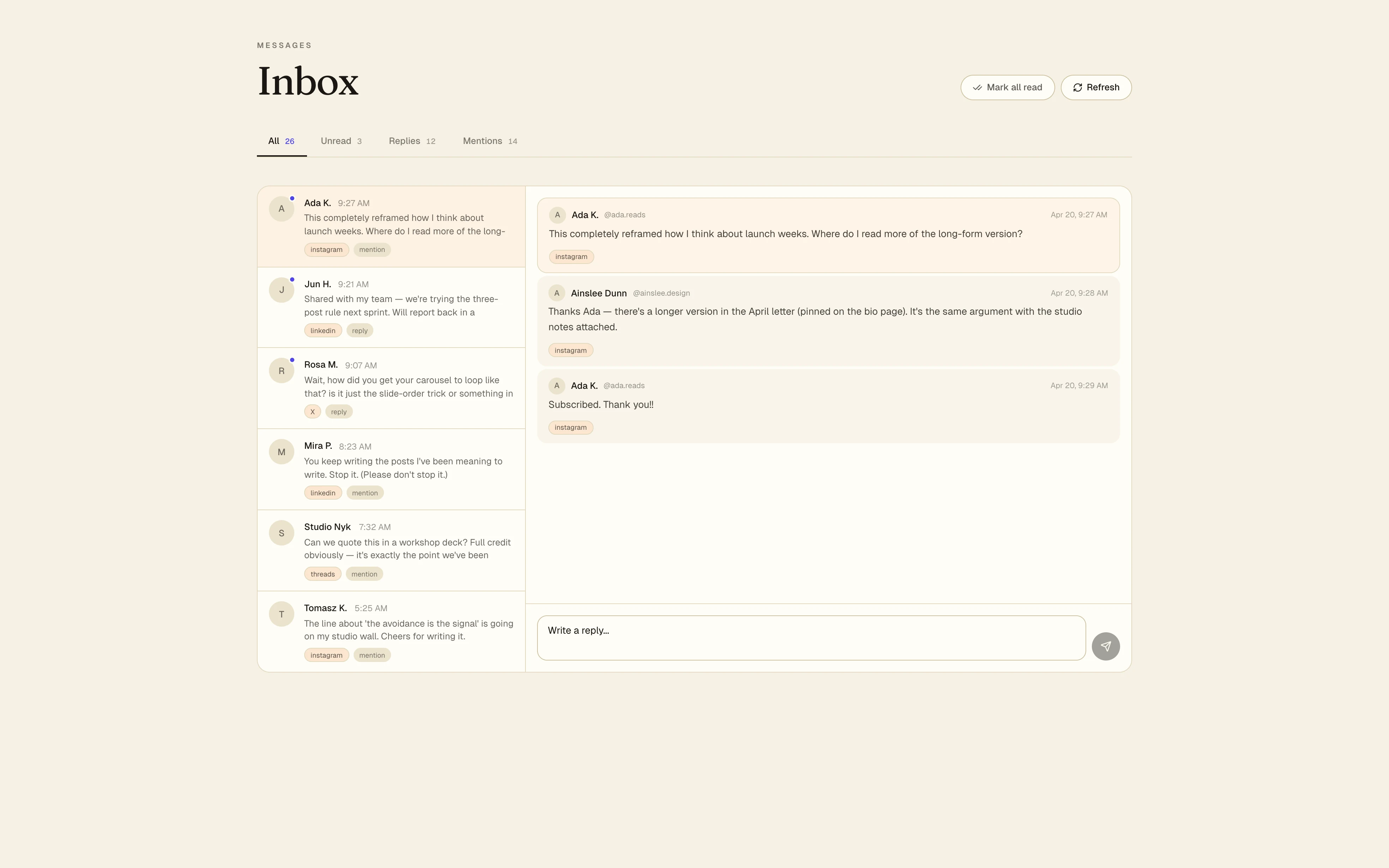
Comments, DMs, mentions, reposts — every channel in one triageable feed. Pin the questions worth answering properly. Knock down the easy ones with a tap. Hand off to a teammate when it's theirs to own.
This completely reframed how I think about launch weeks. Where do I read more?
Shared with my team — we're trying the 3-post rule next sprint.
Wait, how did you get your carousel to loop like that?
Triage, not a fire hose
Inbox reads the shape of every message and sorts them into buckets — questions, praise, complaints, spam. Questions from existing customers go first. "Nice post 🔥" gets a one-tap heart. Spam never shows up.
Reply drafts by Muse
Muse — the same voice model that powers Composer — drafts the reply too, three variants short to long, adjusted to the channel convention. Edit or send as-is. You're the last set of eyes, always. Available on every channel you've switched Muse on for.
Ada K.
@ada.reads · returning
"This completely reframed how I think about launch weeks. Where do I read more?"
Start with the field note from March — it's where this framework first landed →
Glad it landed. The thinking started in a field note back in March — that's the best place to start. Happy to send the follow-up essay too if you want to go deeper.
Thanks Ada — that's the nicest version of 'explain more' I've gotten all week. The essay I'd point you at is 'The seventh telling' from March, and then the follow-up on cadence from two weeks ago. Both linked in my bio if you want the direct paths.
Assignment view — a thread routed to a teammate with SLA chip.
In the drawer · not yet on the shelf
Team handoff
Tag a teammate, set an SLA, and the Inbox routes the thread with the context they need. Customer questions to support, press asks to the right person, "Is this a real partnership?" straight to whoever owns it. Nothing goes lost in a group chat.
How the Inbox works
A triage surface built around replying well, not replying fast. Aloha suggests; you decide; nothing sends itself.
01
Comments, DMs, and mentions from Instagram, LinkedIn, X, Threads, and every channel you've connected — in one feed, newest first.
02
'Returning,' 'new,' or 'customer' — context is already visible before you click into the thread, so you're not keeping it in your head.
03
Muse suggests a reply that sounds like you, not a support script. You accept, tweak, or ignore — nothing ships without a human press.
04
Mark done, snooze until later, or route back to the composer when a message deserves a whole post instead of a one-liner.
05
Triage Instagram when you're in Instagram mode. Bring the rest back when you have the head-space.
06
The Inbox never speaks for you unasked. Every reply you send is one you wrote.